
Macro Space v5 vs v6: Which Version Should You Use?
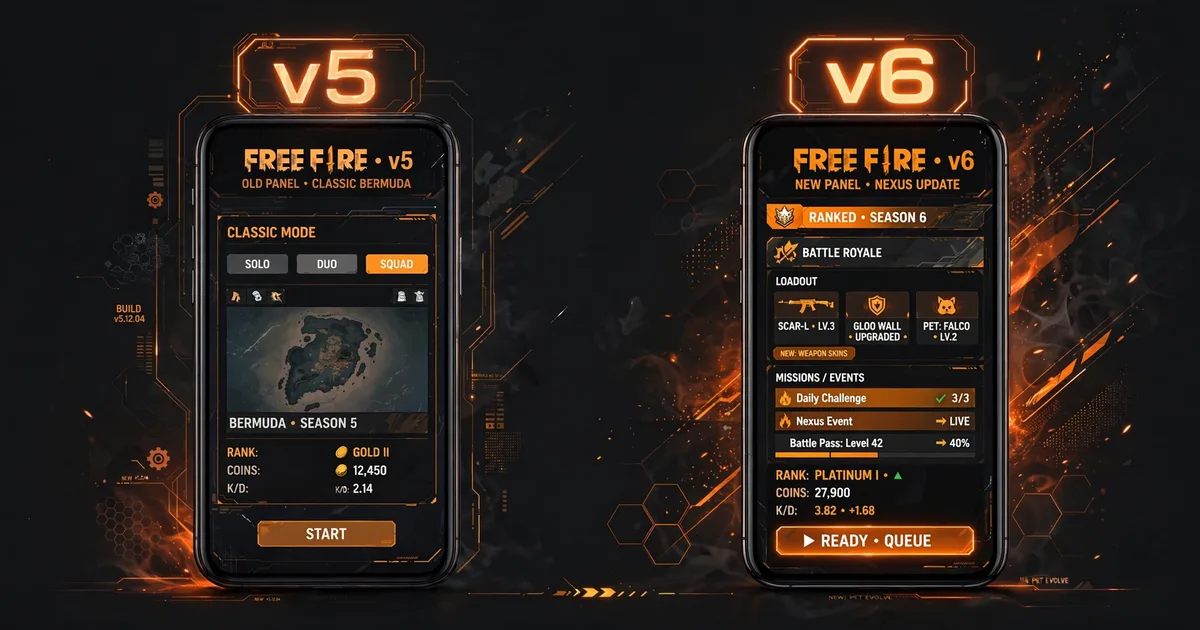
If you're downloading Macro Panel APK today, you're getting v5, but v6 exists, and "newer" is not the same as "better for your phone." v5 is the most downloaded, most tested build in the panel's history; v6 brings a reworked macro engine and a refreshed interface. Which one you should run depends on your device, your patience for re-tuning, and how much you value stability over novelty. Here's the honest breakdown. Grab the latest build from the Macro Space panel page before you start.
Key takeaways: Macro Panel APK ships v5 (8.7 MB, Android 5.0+), the proven stable pick, best for low-end phones and anyone whose setup already works. v6 (8.7 MB) adds a new macro engine for tinkerers on newer phones. You cannot install one over the other; switching means a clean reinstall and re-entering settings.
Side-by-side comparison
| Macro Space v5 | Macro Space v6 | |
|---|---|---|
| File size | 8.7 MB | 8.7 MB |
| Package | com.outer.space | New mainline build |
| Android required | 5.0+ | 4.1+ |
| Release window | The classic stable build | The newer release |
| Macro engine | Original macro tab | Reworked macro engine |
| Interface | Familiar classic layout | Refreshed UI |
| Core tools | Sensitivity, DPI, FPS, GFX, crosshair | Same core tools |
| Best for | Stability, low-end phones | Newest features, newer phones |
What actually changed in v6
Strip away the marketing and v6 is two things: a reworked macro engine and a refreshed interface. The macro tab, aim assist sequences, auto-shot options, scripted actions, was rebuilt to run its sequences more smoothly and with finer timing control. Everything else players actually touch daily (sensitivity sliders, DPI changer, FPS/GFX presets, floating crosshair, RAM cleaner) carries over essentially unchanged. This works even better alongside v5 sensitivity guide.
That matters for expectations. If you use the panel mainly for sensitivity and DPI tuning, v6 feels like v5 with a new coat of paint. The upgrade only earns its keep if you actively use the macro automation features, and those are also the features that carry the most ban risk, so "more macro" is not an unqualified win.
The version confusion, cleared up
Search results mix together several version lines and it confuses everyone, so here is the map: Macro Panel APK is the v5 (com.outer.space) mainline build this site distributes, the one with the huge user base. v6 continues that main line with the new macro engine. Separately, older listings floating around the web show a v2-era build under a different package (com.spgregedit.yt, credited to SP REGEDIT), that is an older, separate lineage, not a downgrade path from v5. When people ask "v5 or v6," they mean the mainline pair, and that is what this comparison covers.
Rule of thumb: if a download page shows you a package name that doesn't match the version it claims, close the tab. Mismatched version/package pairs are how repackaged fakes travel. Pair this with update safely for the complete setup.
Who should stay on v5
- Low-end phone owners. v5's long testing history on 2-3 GB RAM devices is its superpower. v6's new engine is tuned for newer hardware first.
- Anyone whose setup already works. If your sensitivity is dialed and your overlay is stable, you gain nothing by churning versions. Stability you can feel beats novelty you can't.
- Cautious players. v5 is the known quantity, years of community use, known behaviors, no surprises. New engines mean new edge cases.
Who should try v6
- Macro feature users. If you actually use the macro tab's automation sequences, v6's reworked engine is the whole point of upgrading.
- Newer phones. On recent mid-range and flagship hardware with Android 13+, v6 runs cleanly and the refreshed UI is genuinely nicer to navigate.
- Tinkerers. If you enjoy re-tuning and testing, v6 gives you new toys. Just screenshot your v5 numbers first.
Switching safely between versions
The builds have different signatures, so you cannot install v6 over Macro Panel APK's v5, the installer will throw an "App not installed" error. The safe path: screenshot every settings tab in your current version (sensitivity, DPI, weapon tabs), uninstall the old version completely, install the new APK, re-grant all permissions (overlay, battery exemption), and re-enter your numbers. Budget ten minutes. Do not try to keep both installed, their floating overlays fight each other and Free Fire ends up with neither working properly.
Our verdict
For most players, right now: stay on Macro Panel APK's v5 build. It is the proven build, stable overlay, known behavior on low-end hardware, and every guide on this site is written against it. Move to v6 when you have a concrete reason (you want the new macro engine, or you're setting up a new phone anyway), not because a higher number feels like progress. The best version of a tool is the one that works invisibly while you play, and for the majority of the player base, that is still v5.
FAQs
Is Macro Space v6 really newer than v5?+
Yes. v6 is the newer release with a reworked macro engine, while v5 is the older but most widely tested build. Newer does not automatically mean better for your phone, v5 remains the stability pick, especially on low-end devices.
Can I install v5 and v6 on the same phone?+
Not reliably. The builds use different package names and signatures, and their floating overlays conflict with each other. Pick one version, uninstall the other completely, and re-grant its permissions fresh.
Will my sensitivity settings transfer from v5 to v6?+
No automatic transfer, the versions store presets separately and cannot be installed over each other. Screenshot your v5 sensitivity, DPI, and weapon tabs before switching, then re-enter the numbers in v6 in about two minutes.
Which version is safer from Free Fire bans, v5 or v6?+
Neither version is ban-proof, and v6's newer macro engine is the less-tested quantity. If caution is your priority, v5's long track record and its plain sensitivity/DPI tools (with macro automation left off) are the more conservative choice.

Viktor Kane , Gaming Performance Analyst
Viktor Kane has benchmarked 300+ gaming utility apps on real Android devices since 2020. He specializes in Free Fire performance tools, testing sensitivity panels and macro utilities on a rack of budget to flagship phones before any download button goes live.